Best Budget Projector for Golf Simulator Buyers Guide
Finding the best budget projector for golf simulator doesn’t have to break the bank. This buyers guide walks you through top picks, key specs, and smart buying tips so you can build a killer home golf setup without overspending. You’ll learn exactly what features matter most, which models deliver great value, and how to avoid common mistakes that waste money.
Key Takeaways
- Brightness matters most: A projector with at least 3,000 lumens keeps your golf simulator screen clear even in mixed lighting.
- Short throw projectors save space: They project large images from a short distance, perfect for garage or basement setups.
- 1080p resolution is the sweet spot: It delivers sharp visuals at a budget-friendly price point for golf simulation.
- Laser projectors last longer: They offer better long-term value compared to lamp-based models in the same price range.
- Don’t skip the throw ratio: This number determines how far your projector needs to sit from the screen for the right image size.
- Budget doesn’t mean low quality: Several projectors under $1,000 deliver excellent performance for indoor golf practice.
- Mounting and setup count: The right projector mount and screen pairing makes a huge difference in your golf sim experience.
📑 Table of Contents
- Why You Need a Projector for Your Golf Simulator
- What Makes a Projector Great for Golf Simulation
- Top Budget Projectors for Golf Simulators
- Comparison Table: Budget Golf Sim Projectors
- How to Set Up Your Projector for Golf Simulation
- Common Mistakes to Avoid When Buying a Golf Sim Projector
- Lamp vs Laser: Which Is Better for Golf Sims?
- Expert Insights: What Sim Builders Wish They Knew
- How Much Should You Spend on a Golf Sim Projector?
- Final Thoughts: Finding Your Best Budget Projector for Golf Simulator
Why You Need a Projector for Your Golf Simulator
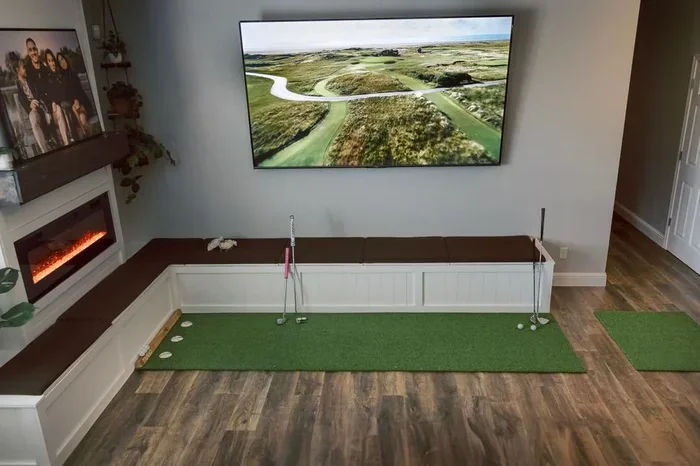
Golf simulators have exploded in popularity over the last few years. More players want to practice at home without driving to the range. A projector for indoor golf is the centerpiece of any setup. It displays the virtual course on your screen and makes the experience feel real.
But here’s the thing. You don’t need to spend thousands to get great results. A best budget projector for golf simulator can deliver sharp images, smooth gameplay, and hours of fun. The key is knowing what to look for and what to avoid.
Whether you’re converting a garage into a personal range or setting up a full sim room in your basement, the right projector changes everything. Let’s break down exactly what you need.
What Makes a Projector Great for Golf Simulation
Not all projectors are created equal. Some work great for movie nights but fall flat for golf sims. Here’s what really matters when you’re shopping for a golf simulator projector.
Brightness (Lumens)
Brightness is the single most important spec. You need a projector that pushes enough light to overcome ambient room light. For a golf sim room projector, aim for at least 3,000 lumens. Anything lower and the image looks washed out during daytime practice.
Here’s a quick breakdown:
- 2,000-2,500 lumens: Works in dark rooms only. Not ideal for most garages.
- 3,000-3,500 lumens: The sweet spot for most home golf sims.
- 4,000+ lumens: Great for rooms with windows or lots of light.
Resolution
Resolution affects how crisp the course looks. 1080p full HD is the best choice for budget setups. It gives you sharp text on scorecards and clear visuals of fairways and hazards. 4K projectors exist but they cost way more and aren’t necessary for most golfers.
Throw Ratio and Distance
The projector throw ratio tells you how far the projector needs to sit from the screen. A short throw ratio means the projector can sit close and still produce a big image. This is perfect for smaller spaces like garages or basements where you can’t push the projector far back.
Contrast Ratio
Contrast ratio determines how well the projector separates light and dark areas. A higher contrast ratio makes greens look green and skies look blue. For golf simulation, look for a contrast ratio of at least 2,000:1. Better contrast means a more immersive feel on the virtual course.
Top Budget Projectors for Golf Simulators
Let’s look at some real options. These projectors deliver solid performance for indoor golf without emptying your wallet. Each one fits a different need and space.
BenQ TH585
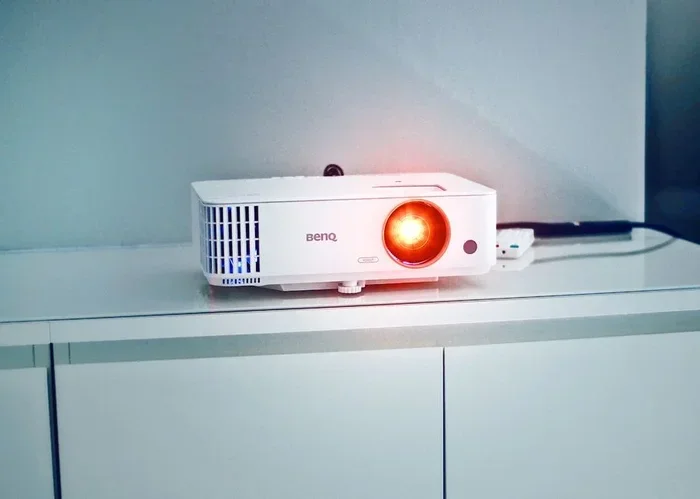
The BenQ TH585 is one of the most popular picks for golf sim builders. It offers 3,500 lumens and full 1080p resolution. The color accuracy is surprisingly good for the price. It also has a low input lag, which matters when you’re swinging and tracking ball flight in real time.
Best part? It’s widely available and easy to find at most retailers. Many golf simulator enthusiasts call it the go-to cheap projector for golf option.
Epson Home Cinema 2250
The Epson 2250 brings 2,700 lumens and 1080p support with 3LCD technology. That means no rainbow effect some single-chip projectors cause. Colors pop on the golf course and the image stays smooth during fast gameplay.
It’s slightly less bright than the BenQ, so it works best in darker rooms. But for a dedicated sim room with light control, it’s a strong contender.
ViewSonic PX701HD
The ViewSonic PX701HD delivers 3,500 lumens and 1080p at a very competitive price. It has a short throw lens option, which is great if you have limited space. The built-in speaker is decent too, though most sim users pair it with external audio anyway.
This model is a favorite among those building a home golf simulator on a tight budget.
Optoma HD146X
The Optoma HD146X packs 3,600 lumens and 1080p resolution into a compact body. It has a fast refresh rate and low input lag. That makes it excellent for real-time golf simulation software like SkyTrak or Foresight Sports.
It also runs quietly, which matters if your sim room doubles as a media room or workout space.
Comparison Table: Budget Golf Sim Projectors
| Projector | Lumens | Resolution | Throw Ratio | Approx. Price |
|---|---|---|---|---|
| BenQ TH585 | 3,500 | 1080p | 1.13-1.46 | $700-$800 |
| Epson HC 2250 | 2,700 | 1080p | 1.33-2.15 | $800-$900 |
| ViewSonic PX701HD | 3,500 | 1080p | 0.9-1.08 (short throw) | $650-$750 |
| Optoma HD146X | 3,600 | 1080p | 1.13-1.47 | $700-$800 |
As you can see, all four projectors hit the 1080p mark and offer solid brightness. The ViewSonic stands out for its short throw capability. The Optoma edges ahead in raw lumens. Your choice depends on your room size and lighting conditions.
How to Set Up Your Projector for Golf Simulation
Buying the right projector is only half the battle. Proper setup makes a massive difference in your experience. Here’s how to get it right.
Choose the Right Screen
Don’t just project onto a white wall. A dedicated golf simulator screen improves image clarity and color accuracy. Look for a screen with a matte white or gray surface designed for projectors. The screen size should match your throw distance and room size.
A 100-inch to 120-inch screen works well for most home setups. It gives you a cinematic feel without requiring a massive room.
Position the Projector Correctly
Place the projector at the right distance based on its throw ratio. Too close and the image looks small. Too far and it spills off the screen. Use a projector calculator online to find the perfect placement before you mount anything.
Mount the projector level and at the correct height. Many sim builders use a ceiling mount or a table mount depending on their room layout. Make sure the projector sits stable and won’t vibrate when you swing.
Deal with Keystone and Focus
Keystone correction adjusts the image shape when the projector isn’t perfectly perpendicular to the screen. Use digital keystone sparingly. It can reduce image quality. Instead, try to angle the projector so the image lands square on the screen for the sharpest picture.
Always fine-tune the focus before each session. A slightly blurry screen ruins the immersion and makes it harder to read shot data.
Quick Tips for Better Setup
- Use a dedicated projector screen, not a wall.
- Darken the room with blackout curtains for best image quality.
- Keep cables organized and away from your swing path.
- Test the projector with your golf software before finalizing the mount position.
- Clean the projector filter regularly to maintain brightness over time.
Common Mistakes to Avoid When Buying a Golf Sim Projector
Even smart buyers make mistakes. Here are the most common ones to watch out for.
Skipping Brightness Requirements
Some shoppers focus only on price and resolution. They ignore lumens. Then they end up with a dim projector that looks terrible in any room with natural light. Always check the brightness first. It’s the feature that directly impacts image quality in real-world conditions.
Buying a 4K Projector on a Budget
4K projectors under $500 exist, but they usually sacrifice brightness and color accuracy. For a budget golf simulator setup, 1080p is more than enough. Save your money for a better lens or a quality screen instead.
Ignoring the Throw Ratio
Not all projectors work in small rooms. If you buy a long-throw projector and your space is tight, you’ll struggle to get a large image. Always measure your room and match it to the projector’s throw ratio before purchasing.
Forgetting About Noise
Some projectors have loud fans. It might not bother you during a movie, but during a golf swing, fan noise can be distracting. Check the noise rating (measured in dB) before you buy. Look for models under 30 dB for a quieter experience.
Lamp vs Laser: Which Is Better for Golf Sims?
This is a big decision when building a golf simulator projector setup. Let’s compare the two technologies side by side.
Lamp Projectors
Lamp projectors are the traditional option. They’re widely available and often cheaper upfront. A typical lamp lasts around 3,000 to 5,000 hours before needing replacement. Replacement lamps can cost $100 to $300 depending on the model.
For casual golfers who practice a few times a week, a lamp projector works great. It’s the most common choice in the budget golf simulator category.
Laser Projectors
Laser projectors use laser diodes instead of traditional bulbs. They last much longer — often 20,000 hours or more. They also maintain brightness better over time. Colors tend to be more vibrant and accurate.
The downside is cost. Laser projectors typically run higher in price. But prices are dropping, and some budget-friendly laser options now exist for sim builders who want long-term value.
Which Should You Pick?
If you practice daily or plan to use your sim for years, a laser projector pays off over time. If you’re on a tight budget and practice occasionally, a lamp projector gets the job done just fine.
Expert Insights: What Sim Builders Wish They Knew
We talked to several experienced golf simulator builders. Here’s what they want you to know before you buy a projector.
Start with brightness. Almost every builder said lumens should be your first filter. “I made the mistake of buying a cheap projector with only 2,000 lumens. It looked fine at night but useless during the day. Learn from my error,” says one sim builder from Ohio.
Don’t forget about audio. While the projector handles visuals, good audio completes the experience. A simple soundbar or external speakers make a huge difference. Many budget projectors have weak built-in speakers.
Match your projector to your software. SkyTrak, Foresight Sports, and other launch monitors all have recommended display specs. Check their guidelines before you buy. Compatibility matters more than you think.
Plan for cable management. Run cables through walls or use cable covers. Loose cables near your hitting area are a safety hazard and look messy.
How Much Should You Spend on a Golf Sim Projector?
Here’s the honest truth. You can build a solid golf simulator setup with a best budget projector for golf simulator for between $500 and $1,000. That covers the projector and a basic screen.
If you have a bit more flexibility, spending $1,000 to $1,500 gets you a higher-quality projector with better color accuracy and longer lifespan. But you don’t need to spend that much to enjoy great practice sessions at home.
The money you save on the projector can go toward better launch monitor technology or a larger screen. Balance is key.
Final Thoughts: Finding Your Best Budget Projector for Golf Simulator
Choosing the right projector for your golf simulator comes down to a few core decisions. Brightness, resolution, throw ratio, and price all play a role. The good news is you don’t need a massive budget to get excellent results.
A best budget projector for golf simulator like the BenQ TH585 or ViewSonic PX701HD can transform your practice routine. You’ll hit shots on virtual courses, track your data, and improve your game — all from the comfort of home.
Take your time. Measure your space. Read reviews. And don’t let marketing hype push you into overspending. The right setup at the right price gives you everything you need to practice like a pro without the pro price tag.
Start with one of the models we covered in this guide. Set it up properly. And enjoy the game, rain or shine, day or night.
Frequently Asked Questions
What is the best cheap projector for a golf simulator?
The BenQ TH585 and ViewSonic PX701HD are widely regarded as the best cheap projectors for golf simulators. Both offer 3,500 lumens and full 1080p resolution at prices under $800. They deliver sharp images and smooth performance for indoor golf practice.
How bright does a projector need to be for a golf simulator?
For most home golf simulators, a projector with at least 3,000 lumens works well. If your room has windows or ambient light, aim for 3,500 lumens or higher. Brightness is the most important spec for a clear, vibrant image on your simulator screen.
Can I use a short throw projector for my golf sim?
Yes, short throw projectors are excellent for golf sims. They produce a large image from a short distance, which is perfect for smaller rooms like garages or basements. The ViewSonic PX701HD is a great budget option with a short throw lens.
Do I need a 4K projector for golf simulation?
No, 4K is not necessary for golf simulation. A 1080p projector provides sharp, detailed images that are more than sufficient for tracking ball flight and enjoying virtual courses. 4K projectors cost significantly more and the extra detail is hard to notice during gameplay.
What screen size works best for a budget golf simulator?
A 100-inch to 120-inch screen is ideal for most home golf simulators. It provides a large, immersive image without requiring a massive room. Match the screen size to your projector’s throw ratio and your available space for the best results.
Is a laser or lamp projector better for a golf simulator?
Laser projectors last longer and maintain brightness better over time, making them ideal for daily practice. Lamp projectors are cheaper upfront and work great for casual users. Choose laser if you plan to use your sim regularly for years. Choose lamp if you’re on a tight initial budget.
=== CONCLUSION ===
Building a home golf simulator is one of the best investments a golfer can make. And the best budget projector for golf simulator is the foundation of that setup. You don’t need to spend a fortune to get sharp images, smooth gameplay, and hours of realistic practice.
Focus on brightness, stick with 1080p resolution, match your projector to your room size, and avoid the common mistakes outlined in this guide. With the right projector and a solid setup, you’ll be hitting virtual fairways in no time.
Start today. Pick one of the models we reviewed. Measure your space. And take your golf game to the next level — from the comfort of home.