Best Golf Simulator for Garage Setup Guide 2025
Looking for the best golf simulator for garage setup in 2025? This guide covers everything you need to know, from top features and leading models to step-by-step setup tips. A garage golf simulator transforms unused space into a personal practice center where you can refine your swing year-round. We break down the best options, compare key features, and highlight common mistakes to avoid. Whether you are a beginner or seasoned golfer, this guide helps you build the perfect home golf course setup.
Setting up the best golf simulator for garage use is one of the smartest moves any golfer can make. Whether you are a weekend warrior or a serious player, having a dedicated practice space at home changes everything. You no longer need to book expensive bay time at the range. Instead, you can work on your swing whenever the mood strikes.
A garage golf simulator turns an often unused space into a personal training center. The garage golf setup has become one of the most popular ways to enjoy indoor golf practice at home. With the right equipment, your garage becomes a home golf course where you can refine every aspect of your game. This guide walks you through everything you need to know in 2025.
Key Takeaways
- A garage golf simulator gives you year-round practice without ever leaving home, rain or shine.
- Launch monitor accuracy is the most important feature to prioritize when choosing your system.
- Budget options like SkyTrak and OptiShot deliver great value for beginners and casual players.
- Proper space planning prevents setup mistakes and improves your overall experience significantly.
- The right mat, enclosure, and screen make a huge difference in realism and swing feel.
- Golf simulator software with real courses adds fun and variety to your indoor golf practice sessions.
- Investing in quality components saves money compared to frequent range visits over time.
📑 Table of Contents
Why a Golf Simulator for Your Garage Makes Sense
A garage golf simulator offers benefits that go far beyond simple convenience. Let us explore why so many golfers are making this smart investment in their game.
Play Golf Anytime, Rain or Shine
One of the biggest advantages is the freedom to practice whenever you want. Outdoor ranges close in the winter. Rain cancels weekend plans. With a golf simulator setup in your garage, the weather is never a problem. You get unlimited access to indoor golf practice all year round. Snow, heat, or thunderstorms cannot stop your progress.
Improve Your Game Faster with Real Data
Modern golf simulation technology gives you detailed feedback on every single shot. A golf launch monitor tracks ball speed, launch angle, spin rate, and more. This data helps you understand exactly what your club is doing at impact. Over time, you can make informed adjustments that lower your scores. It is like having a personal coach available every day.
Save Money on Range Fees and Travel
The golf simulator price might seem high at first. But think about how much you spend on range balls and bay fees each year. A quality setup pays for itself within a season or two. Plus, you get the added value of a full golf training equipment station right at home. No more driving to the range after a long workday.
Top Features to Look For in a Garage Golf Simulator
Not all golf simulator packages are created equal. Here are the key features that separate a great setup from a mediocre one.
Launch Monitor Accuracy
The golf launch monitor is the brain of any simulator. It measures carry distance, ball speed, and club head speed with precision. Look for a unit that uses photometric or radar-based tracking. The more accurate your data, the better your golf swing analyzer results will be. Some systems use infrared sensors, while others rely on high-speed cameras. Camera-based systems tend to offer more detailed data for serious players.
Screen and Projection Quality
A crisp, bright screen makes a huge difference in your experience. You want a projector golf simulator setup that delivers vivid, lifelike graphics. The screen should be large enough to fill your field of view. This creates a truly immersive indoor golf experience. Look for screens with high gain ratings that reflect light efficiently. A good projector with at least 3,000 lumens keeps the image sharp even in a well-lit garage.
Hitting Mat and Enclosure
Do not overlook the basics of your golf simulator for garage build. A quality golf mat for garage feels realistic underfoot and provides consistent ball contact. The golf simulator enclosure keeps balls contained and protects your garage walls from damage. Together, these components make your garage golf setup safe and enjoyable. A golf hitting net adds an extra layer of protection behind the screen.
Software and Course Library
The golf simulator software determines which courses you can play and what practice tools are available. Top platforms offer hundreds of real-world courses from around the globe. You can play St. Andrews, Pebble Beach, or Augusta National from your garage. Some systems also include skill challenges, driving range modes, and putting greens. The software experience can make or break your enjoyment of the setup.
Best Golf Simulator for Garage Options in 2025
Now let us look at the top options available this year. Each system has its strengths, so choose based on your goals, space, and budget.
Comparison of Top Golf Simulators
| System | Launch Monitor | Screen Size | Price Range | Best For |
|---|---|---|---|---|
| SkyTrak | Photometric | 100 inches | $2,000-$2,500 | Budget-friendly accuracy |
| Full Swing Golf | Dual-camera | 120 inches | $5,000-$7,000 | Immersive full-swing practice |
| OptiShot 2 | Infrared | 100 inches | $1,500-$2,000 | Entry-level setup |
| Foresight GCQuad | Dual-camera | 120 inches | $15,000-$20,000 | Professional-grade analysis |
Each of these best golf simulator for garage options delivers a different experience. The SkyTrak offers excellent value and accuracy for the price. It is a favorite among amateur golfers who want professional data without the pro price tag. Full Swing Golf provides a truly immersive feel with its dual-camera tracking system. The impact screen and surround sound create a true home golf course atmosphere that is hard to beat.
Why the SkyTrak Stands Out
The SkyTrak has earned a loyal following among golfers of all skill levels. It delivers professional-grade data in a compact, affordable package. The golf simulator package includes everything you need to get started. Setup is straightforward, and the companion app is intuitive and easy to navigate. It is an ideal choice for those who want reliable golf practice at home without a huge upfront investment.
Why Full Swing Golf Leads for Immersion
If you want the most realistic indoor golf experience, Full Swing Golf is hard to beat. The dual-camera system tracks the ball and club with remarkable precision. The high-definition impact screen and spatial audio create a truly engaging environment. It feels like you are standing on a real fairway. This system is perfect for golfers who want both serious training and fun gameplay.
Why OptiShot 2 Is Great for Beginners
The OptiShot 2 is a fantastic entry point for those new to golf simulation technology. It uses infrared sensors to track your club path and ball direction. The setup is simple and does not require a projector in basic configurations. It is an affordable way to test whether a garage golf simulator is right for you before investing in a more advanced system.
How to Set Up Your Golf Simulator in the Garage
A proper golf simulator setup makes all the difference in performance and enjoyment. Follow these steps to create a space that works beautifully for years to come.
Step 1: Measure Your Garage Space
Start by measuring the length and width of your garage carefully. You need at least 10 feet of depth for a comfortable and full swing. The width should accommodate your stance plus the screen. A golf simulator enclosure works best when you have clear measurements before purchasing any equipment. Write down your dimensions and bring them when shopping for a golf simulator for garage package.
Step 2: Install the Hitting Mat
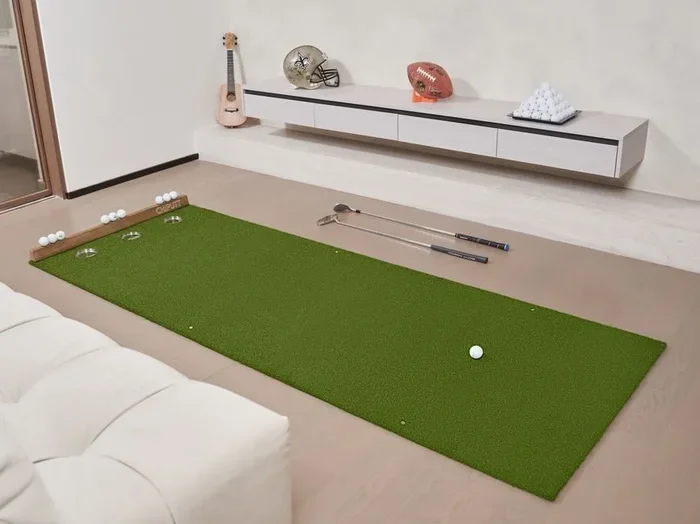
Lay down a quality golf mat for garage that mimics real turf as closely as possible. Place it in the center of the space where you will stand. Make sure the mat is level and secure. A good mat protects your garage floor and provides a realistic feel underfoot. Look for mats with a rubber base that prevents slipping during your swing.
Step 3: Set Up the Screen and Projector
Mount the screen on the wall opposite your hitting position. The projector should be placed on a stable surface or ceiling mount. Align the image so it fills the screen completely without distortion. This is the heart of your projector golf simulator experience. Take your time with this step because a misaligned screen ruins the immersion.
Step 4: Position the Launch Monitor
Place the golf launch monitor behind the hitting area, following the manufacturer’s guidelines. The placement distance and angle are critical for accurate readings. Proper positioning ensures reliable data for your golf swing analyzer and practice sessions. Double-check the setup with a few test shots before your first virtual round.
Step 5: Connect and Calibrate Everything
Power on all components and run the calibration process included with your system. Open the golf simulator software and follow the on-screen instructions carefully. Take several practice swings to verify that everything is tracking correctly. This step is essential for reliable golf simulation technology and accurate feedback over time.
Quick Tips for a Smooth Setup
- Use cable management to keep wires tidy and prevent tripping hazards
- Add LED lighting to reduce glare on the impact screen
- Install a net behind the screen for extra ball containment and safety
- Keep the garage door closed during use for better acoustics and immersion
- Test the setup with real shots before your first virtual round
- Add a small shelf or table for your phone, drinks, and accessories
Common Mistakes to Avoid When Setting Up
Even the best golf simulator for garage can fall short if you make avoidable errors. Here are the most common mistakes and how to prevent them.
Skipping the Enclosure
Some golfers skip the golf simulator enclosure to save money upfront. This is a costly mistake in the long run. Without proper containment, balls will damage your garage walls, lights, and stored tools. The enclosure also improves safety for family members and pets who may walk through the area. Always include an enclosure in your garage golf setup budget.
Choosing the Wrong Mat
A thin or cheap golf mat for garage ruins the entire experience. It does not replicate the feel of real grass and can cause inconsistent ball strikes. Worse, a poor mat can affect your swing mechanics over time. Invest in a quality mat that is at least 1.5 inches thick with a realistic turf surface. Your golf practice at home will be far more productive with the right mat.
Ignoring Room Acoustics
Garages often have hard concrete floors and walls that create echo and noise. This can be distracting during indoor golf practice sessions. Add foam panels or rubber mats to dampen sound and improve the acoustic environment. A quieter space leads to better focus and more productive practice. It also makes the experience more enjoyable for everyone in the household.
Underestimating Space Requirements
Do not try to squeeze a full setup into a tight space. You need room to swing freely without hitting anything. If your garage is too small, consider a backyard golf simulator or an outdoor net setup instead. A cramped setup leads to bad habits and frustration. Measure your space carefully and choose a system that fits your dimensions comfortably.
Forgetting to Calibrate
Skipping the calibration step is a mistake many beginners make. Without proper calibration, your golf launch monitor will deliver inaccurate data. This leads to misleading feedback and potentially bad swing adjustments. Always run the full calibration process and re-calibrate if you move any component. Accurate data is the foundation of effective golf training equipment.
Final Thoughts: Finding the Right Setup for You
Choosing the best golf simulator for garage depends on your budget, available space, and personal goals. There is no single perfect system for every golfer. But with the right research and planning, you can build a setup that transforms your practice routine and lowers your scores.
What Matters Most for Your Setup
Start by identifying your top priorities. Are you looking for accuracy and detailed data? Choose a system with a top-tier golf launch monitor and advanced analytics. Do you want fun and immersion above all else? Focus on screen quality, course variety, and surround sound. Are you on a tight budget? The golf simulator price varies widely, and there are excellent options at every price point. The SkyTrak and OptiShot 2 prove you do not need to spend a fortune to get started.
The Bottom Line
A garage golf simulator is more than a fun gadget. It is a serious training tool that can lower your scores and deepen your love for the game. The golf simulation technology available in 2025 is better than ever before. Whether you are a beginner just learning the fundamentals or a seasoned player chasing lower scores, there has never been a better time to bring the golf course home. Take your time, invest in quality components, and enjoy the journey of improvement right from your own garage.
The right golf simulator for garage setup pays dividends every time you step up to the tee. You will practice smarter, play more, and enjoy the game even more than before. Start planning your setup today and experience the difference a home simulator can make.
Frequently Asked Questions
What is the best golf simulator for a small garage?
The SkyTrak and OptiShot 2 are excellent choices for smaller garage spaces. Both systems are compact, affordable, and deliver accurate data without requiring a huge footprint. They fit easily in garages as small as 10 feet deep and still provide a great indoor golf experience.
How much does a garage golf simulator cost?
The golf simulator price ranges widely depending on the components you choose. Entry-level setups with the OptiShot 2 start around $1,500. Mid-range systems like the SkyTrak run between $2,000 and $2,500. Premium setups with Full Swing Golf can cost $5,000 or more. Your budget and goals will determine the best option for you.
Do I need a projector for a golf simulator?
Most golf simulator for garage setups use a projector and impact screen for the best immersive experience. However, some systems like OptiShot 2 offer TV-based options that do not require a projector. A projector creates a larger, more engaging display that makes you feel like you are on a real course.
Can I use a golf simulator in a one-car garage?
Yes, you can set up a simulator in a one-car garage, but you will need at least 10 feet of depth for a comfortable swing. Choose a compact system and a smaller screen size. Make sure you have enough clearance on both sides for a natural swing path. Measure your space carefully before purchasing any equipment.
What clearance do I need for a golf simulator?
You need a minimum of 10 feet of depth from your hitting position to the screen. The height clearance should be at least 9 feet to accommodate your swing arc. Width depends on your stance and the screen size, but 12 to 15 feet is ideal. Always measure your space before buying a golf simulator package.
Is a golf simulator worth the investment?
For most golfers, a garage golf simulator is absolutely worth the investment. It saves money on range fees over time, provides year-round practice, and delivers valuable data to improve your game. A quality setup also adds value to your home and creates a fun family activity space. If you love golf and want to play more, it is a smart choice.