Best Golf Simulator With Putting For Your Home Setup
Looking for the best golf simulator with putting? This guide covers everything you need to know. We reviewed top-rated systems, compared features, and shared expert tips to help you choose the right setup. Whether you are a beginner or a seasoned golfer, a home simulator with a putting feature can transform your game.
There is nothing quite like stepping onto a real green and sinking a perfect putt. But when the weather turns bad or the course is too far away, your practice routine suffers. That is where the best golf simulator with putting comes in. A quality indoor setup lets you work on your full swing and your short game without leaving the house.
If you have been searching for a golf simulator that includes a realistic putting feature, you are in the right place. In this guide, we break down the top options, explain what to look for, and share practical tips to help you make the best choice. Whether you are a weekend warrior or a serious golfer, this guide has something for you.
Key Takeaways
- Putting is essential: A simulator with a built-in putting feature saves you trips to the range.
- Top picks vary by budget: Options range from affordable setups under $500 to premium systems over $5,000.
- Look for key features: Focus on accuracy, software quality, and putting surface quality.
- Space matters: You need at least 10 feet of clearance for a comfortable setup.
- Setup is easier than you think: Most modern systems install in a single afternoon.
- Practice makes perfect: Regular use at home leads to measurable improvement on the course.
📑 Table of Contents
Why a Golf Simulator With Putting Is a Game Changer
Most people think of a golf simulator as a tool for working on full swings. But putting accounts for nearly 40 percent of your total strokes in a round. Ignoring it means leaving strokes on the table. A simulator with a dedicated putting feature changes that completely.
Here is why adding a putting function to your indoor setup matters so much:
- Realistic green surfaces: Premium simulators use specialized mats that mimic the speed and feel of real putting greens.
- Instant feedback: Many systems track ball speed, line, and distance so you can see exactly what you did right or wrong.
- Convenience: You can practice putting at 7 a.m. before work or at 10 p.m. after dinner. No driving to the course required.
- Year-round access: Rain, snow, or extreme heat will never stop your practice again.
- Lower scores: Consistent putting practice at home translates directly to fewer putts on the course.
A home golf simulator with putting capability gives you a complete practice experience. You do not have to choose between working on your drive and polishing your short game. It all happens in one space.
How Putting Practice Helps Your Overall Game
Think about your last round. How many putts did you take? Most amateur golfers three-putt more often than they would like. A golf simulator with putting lets you drill those critical six-footers and long lag putts every single day. Over time, your confidence on the green grows, and your scores drop.
Many golfers also find that working on putting indoors reduces the pressure they feel on the course. When you know you have put in the reps at home, you walk up to the first green with more calm and focus. That mental edge is priceless.
Top Features to Look For in a Golf Simulator
Not all simulators are created equal. Some focus on full-swing accuracy while others shine on the putting side. When you are shopping for the best golf simulator with putting, here are the features that matter most.
Putting Surface Quality
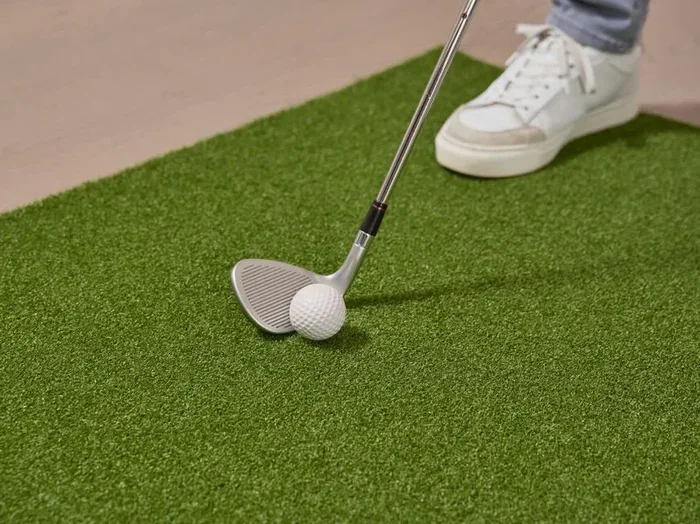
The putting mat is the heart of your indoor practice. Look for a mat that is at least three feet wide and feels smooth under your putter. High-end simulators use multi-layered mats that replicate the roll of a real golf course green. Cheaper options may feel bumpy or inconsistent, which can mess with your stroke.
Quick Tip: Place your hand under the mat and roll it back and forth. If it feels uniform and flat, it is a good sign. If you feel bumps or unevenness, keep looking.
Accuracy and Tracking Technology
The brain behind any great indoor golf setup is the launch monitor or tracking system. This is what measures ball speed, launch angle, spin rate, and putt direction. Top-tier systems use high-speed cameras or infrared sensors to capture data with incredible precision.
For putting specifically, you want a system that tracks:
- Ball speed: Helps you gauge how hard to hit each putt.
- Start line: Shows whether your putt starts on the intended line.
- Distance control: Tracks how far the ball actually travels.
- Break and slope: Some advanced systems simulate real green undulations.
Software and Course Selection
The software is what makes your golf simulator setup feel like a real round. Look for platforms that include famous courses from around the world. The best simulators let you play St. Andrews, Augusta, or Pebble Beach from your living room. For putting practice, look for software that offers dedicated putting greens and drills.
Space and Setup Requirements
You do not need a massive room to enjoy a golf simulator with putting. A space that is at least 10 feet deep and 10 feet wide works for most setups. Make sure your ceiling height allows for a full swing without hitting anything overhead. A garage, basement, or spare bedroom all work great.
Best Golf Simulators With Putting Compared
With so many options on the market, choosing the right one can feel overwhelming. Below we compare the top contenders in the best golf simulator with putting category. Each has its strengths, so let us break them down.
| Simulator | Putting Feature | Price Range | Best For |
|---|---|---|---|
| SkyTrak Golf Simulator | Compatible with putting mats and software | $2,000 – $2,500 | Budget-conscious golfers wanting accuracy |
| Foresight Sports GCQuad | Advanced putting analytics and green simulation | $5,000+ | Serious golfers and coaches |
| AboutGolf 3D | Built-in putting green with full course play | $3,500 – $4,500 | Home game rooms |
| Golfzon Vision Pro | Integrated putting mat and AI-powered analysis | $4,000 – $6,000 | Tech-savvy golfers |
| Rapsodo MLM2Pro | Putter-specific data and indoor putting mode | $500 – $700 | Beginners and casual players |
Each of these systems offers a different balance of price, features, and putting quality. If you are on a tighter budget, the Rapsodo MLM2Pro is a fantastic entry point. For those who want a full-blown indoor golf experience, the Foresight GCQuad or Golfzon Vision Pro deliver premium results.
Budget vs. Premium: What You Get
Budget-friendly simulators under $1,000 usually offer basic tracking and require you to add a separate putting mat. Mid-range systems between $1,000 and $3,000 start to include better software and more accurate data. Premium setups above $3,000 deliver a truly immersive experience with realistic greens, detailed analytics, and stunning visuals.
When deciding on your home golf simulator, think about how often you will use it and what your goals are. If you are serious about lowering your handicap, investing in a higher-end system pays off over time.
How to Set Up Your Indoor Putting Area
Setting up a golf simulator with putting at home is easier than most people think. You do not need a contractor or a professional installer. With a little planning, you can have everything ready in a single weekend.
Step-by-Step Setup Guide
- Choose your room: Pick a space with enough room for your swing and a clear path to the screen or net.
- Install the screen or net: A hitting net works for full swings, while a projector screen adds the visual experience of playing on real courses.
- Lay down the putting mat: Place your putting green or mat at the designated spot. Make sure it is level and stable.
- Set up the launch monitor: Position the tracking device according to the manufacturer’s instructions. Most systems come with clear setup guides.
- Connect the software: Pair your device with the simulator software and run a quick calibration test.
- Add lighting: Good overhead lighting helps your camera or sensor track the ball more accurately.
Quick Tip: Use a level to check your putting mat. Even a slight slope can throw off your feel for distance and break. A flat, stable surface is key to realistic practice.
Creating the Right Environment
Your indoor golf practice space should feel inviting. Consider adding a small shelf for your putter and balls, a mirror for checking your posture, and even a speaker for music or course commentary. The more comfortable your space feels, the more likely you are to use it regularly.
Common Mistakes to Avoid When Choosing a Simulator
Buying a golf simulator is a big decision. Avoid these common pitfalls that can waste your money and frustration.
- Skipping the putting feature: Many simulators focus only on full swings. If you want to work on your short game, make sure putting is included.
- Ignoring room size: Measure your space before you buy. A simulator that requires 12 feet of depth will not work in an 8-foot garage.
- Choosing style over substance: Flashy graphics look great, but accurate ball tracking matters far more for real improvement.
- Forgetting about noise: Some launch monitors are louder than others. If you are using a garage or shared space, look for quieter options.
- Not checking software compatibility: Make sure the simulator works with your tablet, phone, or computer before you buy.
Taking the time to avoid these mistakes saves you money and ensures your golf game room delivers the experience you want.
Expert Tips to Improve Your Putting at Home
Having the best golf simulator with putting is only half the battle. How you practice matters just as much. Here are expert-backed tips to get the most out of your indoor putting sessions.
1. Focus on Distance Control First
Before you worry about holing every putt, work on rolling the ball to the same spot consistently. Set up targets at three, six, and ten feet. Practice until you can leave yourself a tap-in every time. This single skill will save you the most strokes.
2. Use a Mirror for Alignment
Place a small mirror behind your ball to check your putter face angle at address. A square face at impact is the single biggest factor in making more putts. Even a slight misalignment can send your ball wide of the hole.
3. Practice Pressure Putts
Create mini-games at home to simulate on-course pressure. For example, give yourself three putts to win a “hole.” If you miss, you start over. This builds the mental toughness you need on the course.
4. Track Your Progress
Most golf swing analyzer systems let you save and review your data. Use this feature to spot trends. Are you leaving putts short on the low side? Your backstroke may be too long. Data-driven practice leads to faster improvement.
5. Keep Your Routine Consistent
Treat your indoor putting sessions like real rounds. Warm up, pick a routine, and commit to each putt. The more you replicate real-course conditions at home, the smoother your transition to the actual green will be.
Expert Insight: “The best golfers in the world practice putting more than any other part of their game. If you want to lower your scores, spend at least 30 minutes a week on your indoor putting green,” says PGA Coach Mike Shannon.
Key Takeaways
- Putting practice at home is a shortcut to lower scores: A simulator with a quality putting feature lets you drill your stroke every day.
- Look for realistic green surfaces and accurate tracking: These two features make the biggest difference in how effective your practice is.
- Budget options exist for every level: You can find a solid setup starting around $500 or go premium with a full room installation.
- Setup is straightforward: Most systems install in one afternoon with basic tools.
- Avoid common mistakes: Measure your space, check software compatibility, and do not skip the putting feature.
- Consistency beats intensity: Short, regular practice sessions deliver better results than occasional marathon sessions.
Conclusion
Finding the best golf simulator with putting for your home setup is one of the smartest investments a golfer can make. It gives you the freedom to practice anytime, work on every part of your game, and see real improvement in your scores. Whether you choose a budget-friendly option or a premium full-room setup, the key is to get started and stay consistent.
Remember, putting is where rounds are won and lost. By bringing a quality indoor golf practice area into your home, you are giving yourself every advantage. Pick the system that fits your space and budget, set it up, and start sinking more putts today. Your game will thank you.
Frequently Asked Questions
What is the best golf simulator with putting for beginners?
The Rapsodo MLM2Pro is one of the most affordable and user-friendly options for beginners. It offers putter-specific data and an indoor putting mode that makes it easy to track your progress without a steep learning curve.
How much space do I need for a golf simulator with putting?
Most setups require at least 10 feet of depth and 10 feet of width. You also need enough ceiling height for a comfortable full swing. A garage or spare bedroom works perfectly for most home golf simulator installations.
Can I use a golf simulator with putting outdoors?
Most simulators are designed for indoor use. Outdoor use can expose electronics to moisture and dust, which may damage the system. If you want outdoor practice, look for weather-resistant nets and mats instead.
Do I need a projector for a golf simulator with putting?
A projector enhances the experience by displaying full courses on a large screen, but it is not strictly required. Many simulators work with a tablet or computer monitor and still deliver excellent putting practice.
How often should I practice putting at home?
Consistency matters more than duration. Aim for 20 to 30 minutes of focused putting practice three to four times per week. This routine will help you build muscle memory and see noticeable improvement on the course.
Is a golf simulator with putting worth the investment?
Absolutely. A quality golf simulator with putting saves you time and money on range visits, lets you practice year-round, and directly contributes to lower scores. For any golfer serious about improvement, it is a worthwhile investment.